
Repeater
Repeater
Loop over an array of items and execute actions once for each element. Supports loop variables, built-in iteration variables, and a configurable iteration limit.
Also covers the companion Update Variable node, which modifies loop variables during each iteration.
What is the Repeater node?
The Repeater node (also called a Group node) allows a workflow to loop over an array of items. It acts as a container — you place child nodes inside it, and those nodes execute once for each item in the array.
The Repeater supports user-defined loop variables, built-in iteration variables, and a configurable iteration limit. The companion Update Variable node — which only works inside a Repeater — lets you modify loop variables during each iteration.
- Iterate over lists of items from your trigger or previous actions
- Perform the same action multiple times — once for each array element
- Process bulk data efficiently within a single konnector
- Access built-in variables: current item, index, and total count
- Define loop variables that accumulate values across iterations
- Use child Filters, Paths, Code Blocks, and Update Variable nodes inside the loop
Prerequisites
- An active Konnectify account with an existing konnector.
- A konnector with at least one trigger configured.
- An upstream node that produces an array field (trigger data, a previous action, or a Code Block output).
- An understanding of array data structures and which actions should repeat for each item.
- For loop variables: knowledge of what values you need to track or accumulate across iterations.
Understanding Repeater Logic
The Repeater executes its child nodes once for each item in the selected array. Understanding how iteration, variables, and scope work is key to building reliable loops.
Built-in variables (automatically available inside the loop)
| Variable | Description |
| iterationValue | The current item from the array being iterated |
| currentIndex | Zero-based index of the current iteration (0, 1, 2, …) |
| totalItems | Total number of items in the array |
iterationValue, currentIndex, totalItems) cannot be modified via Update Variable. They are only accessible inside the loop.Variable scope
| Scope | Behavior |
| Inside the loop | Loop variables are accessible by child nodes and can be read or updated |
| After the loop | Final values of loop variables are available to downstream nodes outside the Repeater |
| Built-in variables | Only accessible inside the loop — not available to downstream nodes after it completes |
Array of objects
- When the selected items array is an array of objects, the object's child properties are automatically extracted and made available for field mapping inside the loop.
iterationValuerepresents the current object; its properties can be accessed individually.- Exclusivity rule: If you select an array-of-objects field, it must be the only selected array — you cannot combine it with other arrays.
Key Components
The outer node that holds all child actions. It appears on the canvas as a container with a circular-arrows icon. Its height automatically adjusts based on the child nodes inside. Supports collapse/expand to hide or show child nodes.
Defines which array the Repeater iterates over. Selected using the field mapper from an upstream node.
- You can select multiple arrays — they will be iterated in parallel.
- Arrays can come from your trigger, a previous action node, or a Code Block output.
- If the array is empty at runtime, the loop executes 0 times; downstream nodes still run with final variable values.
- If an array-of-objects is selected, it must be the only selected array (exclusivity rule).
A configurable safety cap that prevents runaway loops and controls resource usage.
- Range: 1 to 500 — Default: 500
- If the array has more items than this limit, the loop stops after reaching it.
- Set based on typical array sizes in your workflow to balance safety and performance.
Custom variables defined in the Repeater sidebar that persist across iterations and are accessible both inside and after the loop.
- Each variable needs a unique key (name) and an initial value.
- Key must be a valid JavaScript identifier: letters, numbers,
$,_. Cannot start with a number, be empty, duplicate another name, or use reserved keywords. - Maximum 50 variables per Repeater.
- Updated inside the loop via the Update Variable node.
- Final values are available to downstream nodes after the loop completes.
Any node type can be placed inside a Repeater — App nodes, Filters, Paths, Code Blocks, and Update Variable nodes. They execute once per iteration. You can chain multiple nodes inside the Repeater. Deleting the Repeater cascade-deletes all child nodes.
A special node that only works inside a Repeater. It modifies loop variables during each iteration. Each update row specifies: "Set [variable] to [value]".
- Add multiple rows to update multiple variables in a single node.
- Cannot update the same variable twice in one Update Variable node (no duplicates).
- Cannot update built-in variables (
iterationValue,currentIndex,totalItems). - If no loop variables are defined in the parent Repeater, shows a warning and an empty dropdown.
- At least 1 update row must be configured to save the node.
- Displays a count of configured variables (e.g., "2 variables") with the first 2 variable names shown.
When to Use
Use a Repeater when your workflow needs to process every item in a list individually, rather than treating the list as a single value.
- Bulk record processing (create or update multiple records)
- Sending individual emails to a list of contacts
- Complex operations on each item in a collection
- Converting arrays from one format to another
- Aggregating or accumulating results across items
- Batch operations on groups of related records
- Processing a single record (use a regular node)
- Conditional branching on a single value (use a Filter or Path)
- Nesting loops — Repeaters cannot be placed inside another Repeater
- Workflows where only 1 Repeater is allowed and one already exists in the branch
Step-by-step Guide
- Open your konnector in the Konnectify editor.
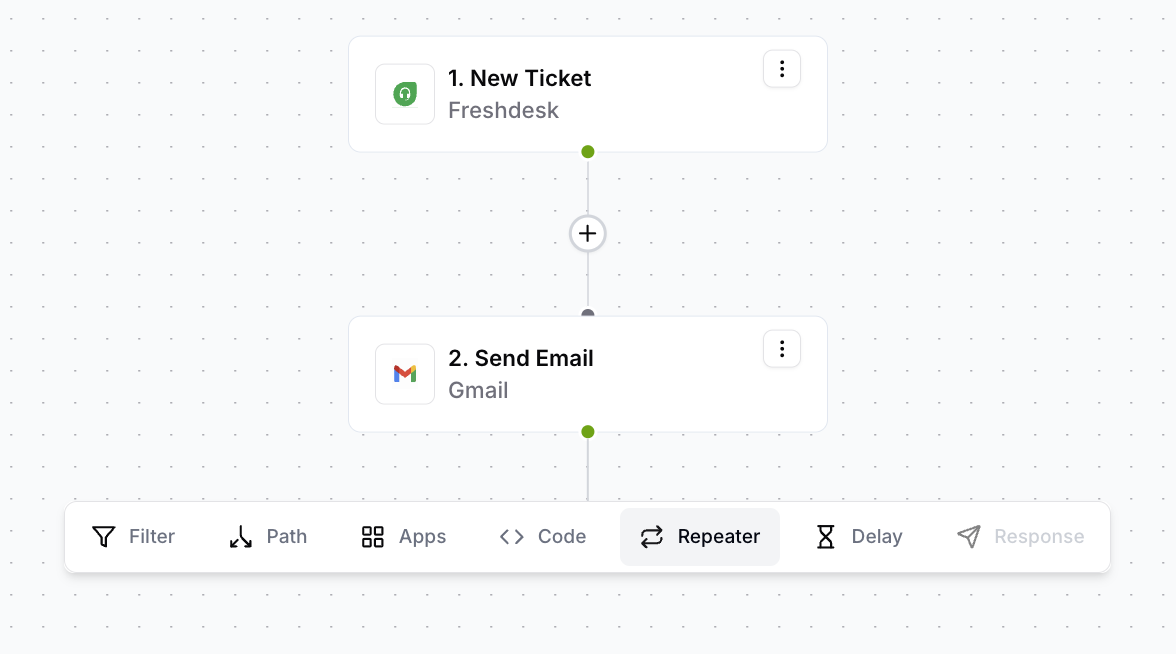
- Click the + button on the node after which you want the loop.
- Select Repeater from the node type menu.
- The Repeater container appears on the canvas and the configuration sidebar opens automatically.
- In the Items Array section, click the field (marked with *).
- Use the field mapper to select an array field from an upstream node — your trigger, a previous action, or a Code Block output.
- You can select multiple arrays; they will be iterated in parallel.
- If selecting an array of objects, it must be the only selected array.
- In the Maximum Iterations field, enter a value between 1 and 500.
- The default is 500. Adjust based on the typical size of your array.
- If the array exceeds this limit at runtime, the loop stops after reaching it.
- In the Loop Variables section, click Add Variable.
- Enter a Key (variable name — must be a valid JavaScript identifier).
- Set an initial Value using the field mapper (literal or field reference).
- Repeat for each variable you need. Maximum 50 per Repeater.
count, Initial value = 0totalAmount, Initial value = 0processedIds, Initial value = [] (empty array)- Click the + button inside the Repeater container on the canvas.
- Select any node type — App, Filter, Path, Code Block, Update Variable, etc.
- Configure the node as normal. Use
iterationValueto access the current item. - Click + again to chain additional nodes inside the loop.
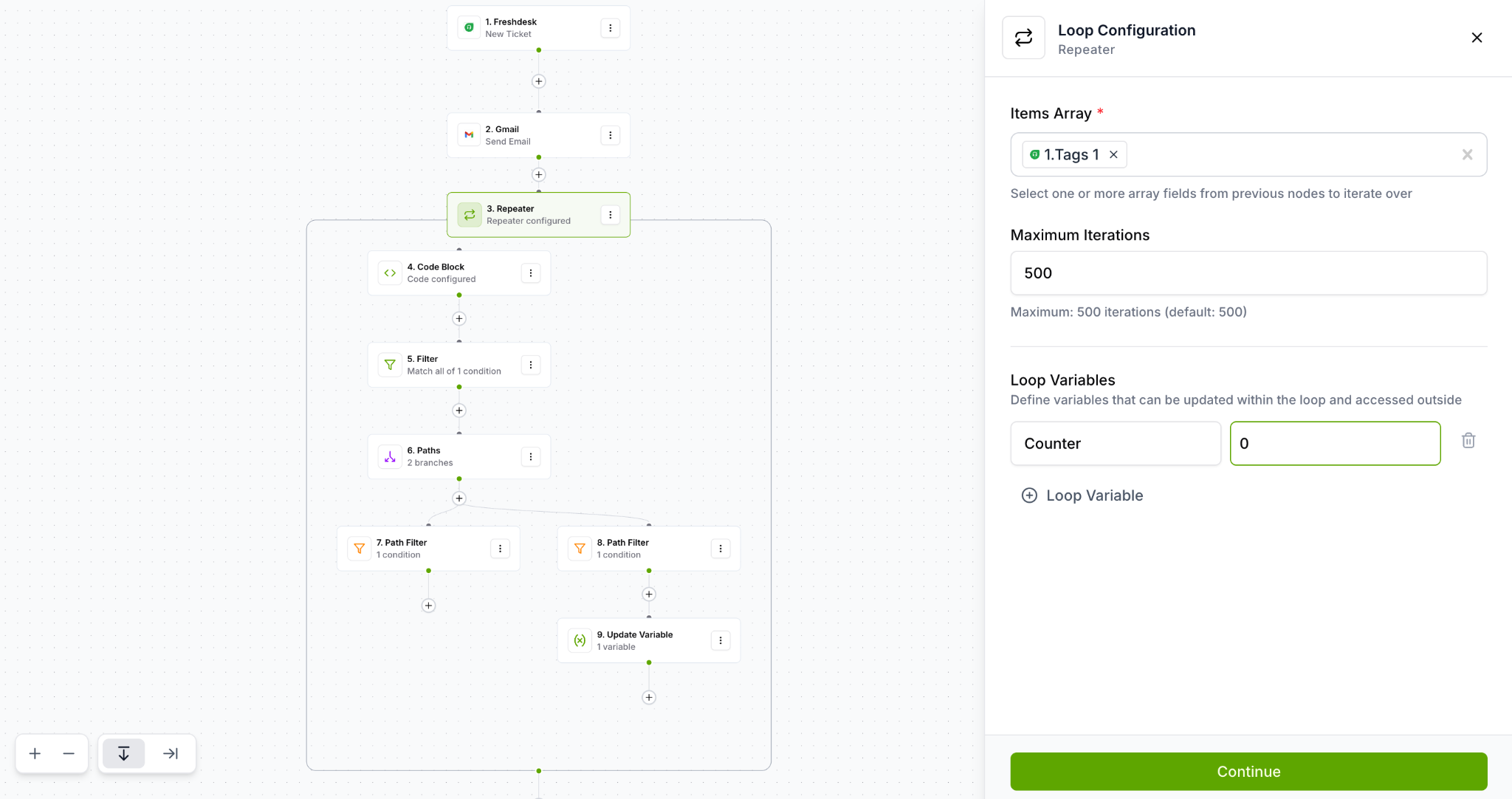
- Inside the Repeater, click + on any child node and select Update Variable.
- The sidebar opens showing the loop variables defined in the parent Repeater.
- Click Add to add an update row.
- Select the variable to update and set its new value using the field mapper.
- Add multiple rows to update several variables at once.
count to {{repeater:count}} + 1total to {{repeater:total}} + {{repeater:iterationValue.amount}}names to append the current item's name- Click Continue in the Loop Configuration panel to save the Repeater settings.
- Review the visual workflow — verify Items Array is mapped, iterations are set, and child nodes are configured.
- Click Save in the top-right corner of the editor.
- Your konnector now includes Repeater logic and is ready for testing.
Things to Know
Edge cases, canvas display states, and platform behaviours worth knowing before you build.
Repeater node display states
| State | Display |
| Unconfigured | Subtitle: "Configure repeater" with warning indicator |
| Configured, no children | Subtitle: "Repeater configured" with warning (no children to execute) |
| Configured with children | Subtitle: "Repeater configured" |
| Warning propagation | If any child node has a warning or is unconfigured, the Repeater also shows a warning |
Edge cases
| Scenario | Behavior |
| Empty Repeater (no children) | Shows warning state; no iterations execute at runtime |
| Items array is empty at runtime | Loop executes 0 times; downstream nodes still run with final variable values |
| Maximum iterations exceeded | Loop stops at the configured limit (default 500) |
| Array of objects with other arrays | Blocked — array-of-objects must be the only selected array |
| No loop variables defined | Update Variable node shows a warning; dropdown is empty |
| Variable name conflict | Duplicate variable names are flagged with validation errors |
| Deleting the Repeater | Cascade-deletes all child nodes inside the Repeater |
| Update Variable outside Repeater | Not available in the add-node menu when outside a Repeater |
Restrictions summary
| Restriction | Detail |
| No nested Repeaters | Cannot place a Repeater inside another Repeater |
| One Repeater per branch | Only 1 Repeater allowed per workflow branch (trigger-to-terminal or PathRule-to-terminal) |
| Maximum iterations | 500 (configurable, range 1–500) |
| Maximum loop variables | 50 per Repeater |
| Variable naming | Must be valid JavaScript identifiers; no duplicates; no reserved keywords |
| Array-of-objects exclusivity | If an array-of-objects is selected, no other arrays can be added |
| Update Variable scope | Only works inside a Repeater; cannot be used outside |
| Built-in variables read-only | iterationValue, currentIndex, totalItems cannot be updated via Update Variable |
| Child node types | Any node type can be added inside a Repeater (App, Filter, Path, Code Block, Update Variable, etc.) |
| Repeater height | Automatically recalculated based on child node dimensions |
Examples
Workflow Diagrams
Child action executes once per array item. Downstream action runs after all iterations complete with final loop variable values.
Loop variables accumulate during iterations. After the loop, their final values are available to downstream nodes.
A Filter inside the loop conditionally skips items that don't match. The loop continues to the next item — it does not stop the entire loop (unless "Stop the loop, if Filter fails" is enabled).
Testing Your Repeater
Thorough testing is especially important for Repeaters — a misconfigured loop can execute hundreds of times with unexpected data.
Use test data with a small array (3–5 items) for initial testing. This keeps execution fast and makes it easy to verify each iteration's output before testing at scale.
Check the execution logs to confirm the Repeater ran the correct number of times — equal to the number of items in your array (or your Max Iterations limit if the array is larger).
In the execution logs, confirm that each iteration used the correct iterationValue — the right item from the array, in order.
If you're using loop variables, verify their final values are what you expect — and that downstream nodes can access them correctly after the loop completes.
Confirm that when the array is empty, the loop runs 0 times and downstream nodes still execute with the initial loop variable values.
All child nodes inside the Repeater must be configured and valid. If any child shows a warning, the Repeater will also show a warning. Resolve all issues before activating the konnector.
Frequently Asked Questions
Items Array & Iteration
What counts as an array field I can iterate over?+
Any array field from an upstream node — your trigger data, a previous action's output, or a Code Block return value. Common examples include lists of tags, line items, contacts, attachments, or email recipients.
You can select multiple arrays; they will be iterated in parallel. If selecting an array of objects, it must be the only selected array.
What happens if the array is empty at runtime?+
The loop executes 0 times. No child nodes run. However, downstream nodes outside the Repeater still execute — they will receive the initial values of any loop variables (since no iterations ran to update them).
What are iterationValue, currentIndex, and totalItems?+
These are built-in variables automatically provided by the Repeater for use inside the loop:
iterationValue— the current item from the arraycurrentIndex— zero-based index (first item = 0)totalItems— total number of items in the array
These are read-only — they cannot be modified via Update Variable. They are only accessible inside the loop, not after it.
What happens when the array has more items than the Maximum Iterations limit?+
The loop stops after processing the configured maximum (default 500). Items beyond that limit are not processed.
To process larger arrays, increase the limit (max 500). If your use case regularly exceeds 500 items, consider batching your data upstream.
Can I select multiple arrays? What does "parallel iteration" mean?+
Yes. You can select multiple array fields from upstream nodes. They are iterated in parallel — on the first iteration, you get item[0] from each array; on the second, item[1] from each; and so on.
Exception: if one of your arrays is an array of objects, it must be the only selected array (the exclusivity rule).
Loop Variables & Update Variable
How do loop variables differ from built-in variables?+
Built-in variables (iterationValue, currentIndex, totalItems) are automatically provided by the Repeater, are read-only, and are only accessible inside the loop.
Loop variables are user-defined, start at an initial value you set, can be updated per-iteration via Update Variable, and their final values are accessible to downstream nodes after the loop completes.
Can I access loop variable final values after the loop?+
Yes. After the loop completes, the final values of all loop variables are available to downstream nodes outside the Repeater. This is how you pass aggregated results (like a total count or sum) to a subsequent Slack message or database entry.
Built-in variables are not available after the loop.
What naming rules apply to loop variables?+
- Must be a valid JavaScript identifier (letters, numbers,
$,_) - Cannot start with a number
- Cannot be empty
- Cannot duplicate another variable name in the same Repeater
- Cannot use reserved JavaScript keywords
Can I update multiple variables in a single Update Variable node?+
Yes. Add multiple rows in the Update Variable node — each row updates one variable. The constraint is you cannot update the same variable twice in a single Update Variable node (no duplicate rows for the same variable).
If you need to update the same variable twice, add a second Update Variable node in the chain.
What happens if I add an Update Variable node but no loop variables are defined?+
The Update Variable node shows a warning and the variable dropdown is empty. You must first define at least one loop variable in the parent Repeater's configuration before the Update Variable node can be configured.
Structure & Restrictions
Can I nest a Repeater inside another Repeater?+
No. Nested Repeaters are not supported. You cannot place a Repeater inside another Repeater.
If you need to process nested arrays, consider flattening them in a Code Block upstream before feeding the result into a single Repeater.
How many Repeaters can I have in one workflow?+
One Repeater per workflow branch. A "branch" is defined as the path from a trigger (or PathRule) to a terminal node. You can have Repeaters in separate Path branches, but not two Repeaters in sequence within the same branch.
What node types can I add inside a Repeater?+
Any node type — App nodes, Filters, Paths, Code Blocks, and Update Variable nodes. You can create complex multi-node chains inside the loop, including conditional logic with Filters and branching logic with Paths.
What happens when I delete a Repeater?+
Deleting the Repeater node cascade-deletes all child nodes inside it — including any Update Variable nodes, Filters, Paths, and other actions in the loop. This cannot be undone, so ensure you no longer need those nodes before deleting.
What does read-only mode mean on a Repeater?+
All configuration fields (Items Array, Maximum Iterations, Loop Variables) and child node editing are disabled. Applied when you lack edit permissions or the konnector is locked during execution.
Was this article helpful?
That’s Great!
Thank you for your feedback
Sorry! We couldn't be helpful
Thank you for your feedback
Feedback sent
We appreciate your effort and will try to fix the article