
What is the + New Button in Konnectify?
Using the + New Button
Your quick-access starting point for creating Konnectors, Agents, and Connections inside Konnectify.
What is the + New Button?
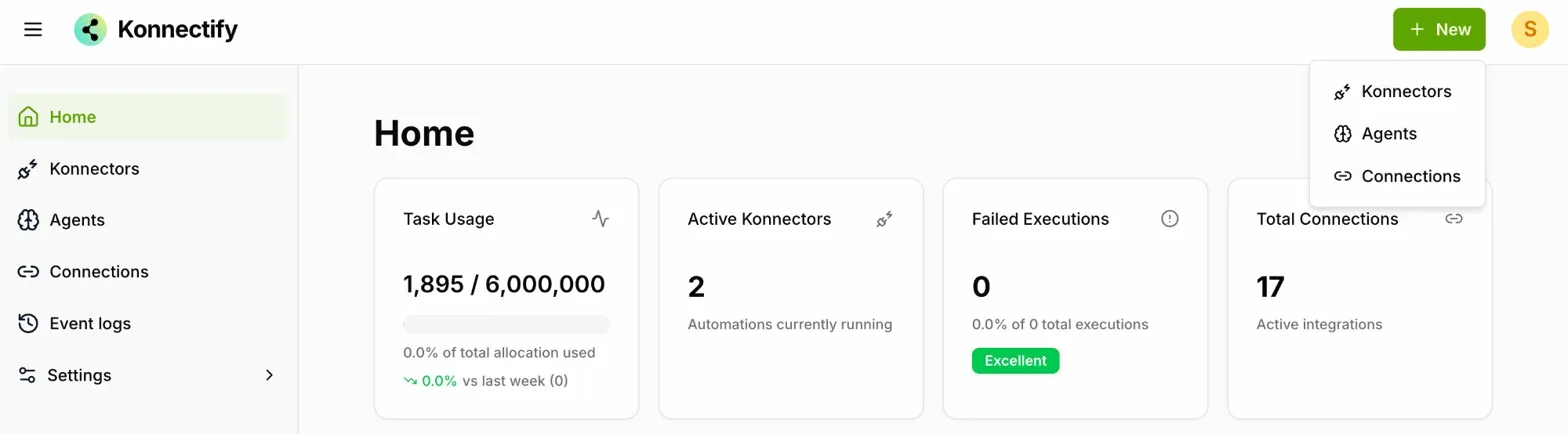
The + New button is the starting point for creating new elements within Konnectify. Clicking it reveals a dropdown with three options:
Create a new workflow automation that connects different apps and automates tasks.
Set up a new AI-powered agent to handle automated interactions.
Establish a new integration between Konnectify and an external application.
How to Access the + New Button
Go to the Konnectify website and log in using your email address and password.
Once logged in, you will land on the Home page. The + New button is located in the top-right corner of the screen.
Click the + New button to open the dropdown menu and select the element you want to create.
Was this article helpful?
That’s Great!
Thank you for your feedback
Sorry! We couldn't be helpful
Thank you for your feedback
Feedback sent
We appreciate your effort and will try to fix the article